MISP Training

Practical, hands-on MISP training that gives your team the skills and confidence to use MISP for real-world threat intelligence and information sharing.

For CTI, SOC and security teams who want to get more out of MISP. No prior MISP experience needed.

Certificate on completion
Private, live online, in your timezone
MISP training

Use MISP more effectively

MISP gives threat intelligence teams a powerful way to store, correlate and share intelligence. But the platform is only useful when your team knows how to use it well.

Our MISP training is practical and hands-on. Your team works through lab scenarios based on real-world use cases, building the skills they need to use MISP in their day-to-day work.
Regions
We run private training in Africa, Asia Pacific, Europe, LATAM, Middle East and North America.
Prerequisites
No prior MISP experience needed. Basic familiarity with the command line is enough.
Equipment
A computer each person can install software on, with administrator rights.
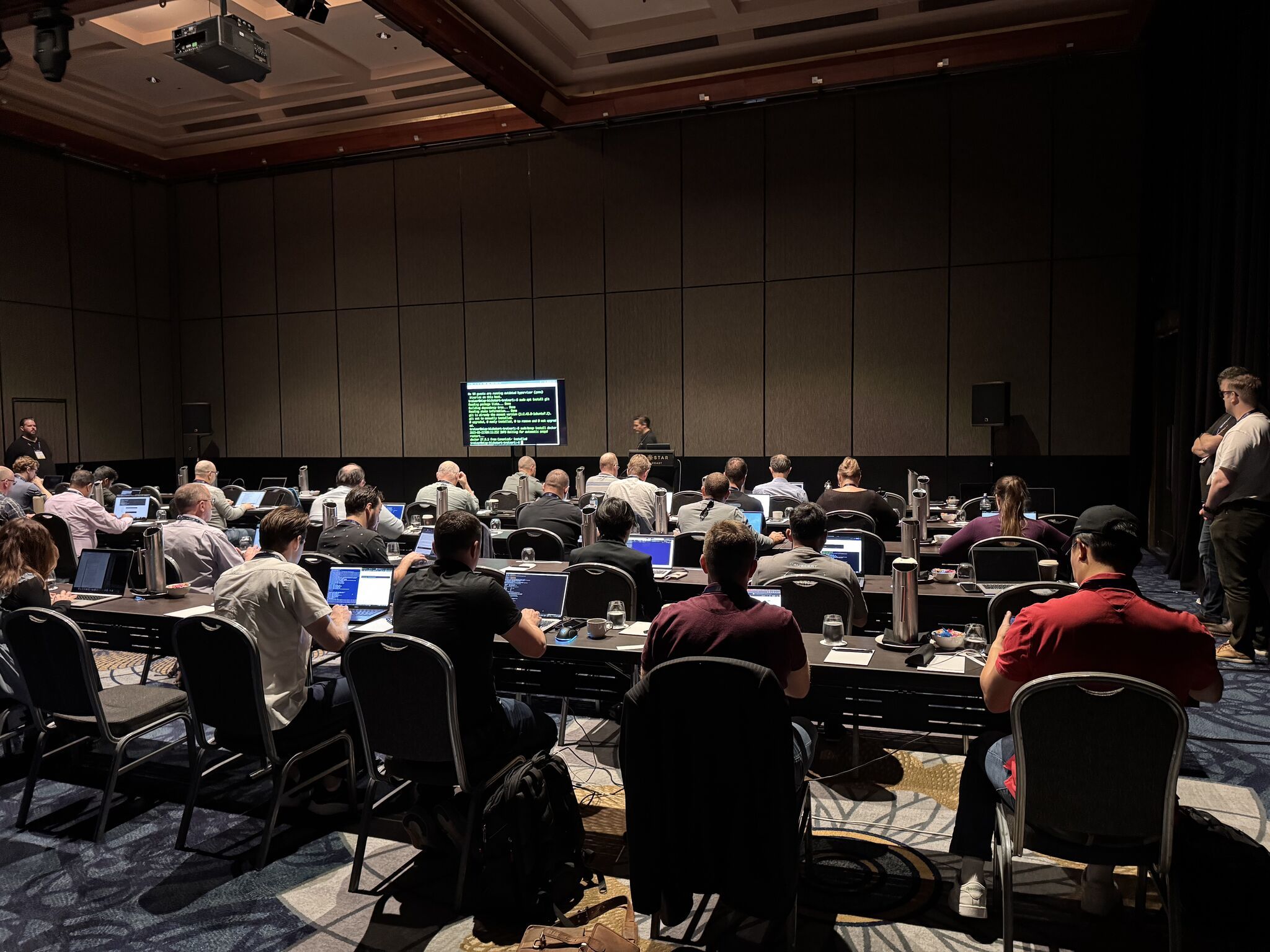
Cosive delivering MISP Kickstart training in person at AUSCERT Brisbane 2025
Why Cosive

Nobody knows MISP better

Cosive delivering MISP Kickstart at AUSCERT Brisbane 2025.
We teach MISP at AUSCERT and hack.lu
Our AUSCERT course in Brisbane sold out to a full room.
We’re core contributors to MISP
We regularly contribute code to the MISP project.
We trained the MISP core team
We have run MISP training for the project’s own developers.
We run MISP in production
We run CloudMISP, our managed MISP service, for major organisations around the world.
Your instructors

Taught by people who build and run MISP

Facilitated by some of the world’s foremost CTI experts.

Instructor
Chris Horsley
Principal Security Consultant & CTO
  • Core contributor to the MISP project, and leads Cosive’s open-source development work
  • Trains and presents on MISP and intelligence sharing at FIRST, AUSCERT, hack.lu and NZITF
  • Leads the engineering behind CloudMISP, Cosive’s managed MISP service
  • Co-founded Cosive in 2015, after 12 years with national CSIRTs
View profile
Instructor
Prescott Pym
Principal Security Consultant
  • Co-designed CTIS, Australia’s national threat sharing programme
  • Contributor to CTI-CMM, the leading CTI maturity framework
  • More than 25 years running Security Operations Centres and CTI programmes
  • Has worked across Australia, India, Japan, Germany, Switzerland and the USA
View profile
Instructor
James Garratt
Infrastructure Lead
  • Has delivered MISP training at hack.lu and AUSCERT
  • Specialises in cloud infrastructure
  • Infrastructure lead for CloudMISP, Cosive’s managed MISP service
  • More than 20 years across IT operations, software engineering and security
View profile
Our track record

We have taught MISP Kickstart publicly, at two of the conferences closest to this work, and privately for individual teams.

AUSCERT

Delivered in person in Brisbane to a sold-out room at AUSCERT 2025.

hack.lu

Delivered at hack.lu in Luxembourg, where much of the MISP community gathers each year.

Private courses

Delivered privately for major organisations.

Our courses · Course 01

MISP Kickstart Training

MISP Kickstart is our practical introduction to MISP. Over two half-days, live and online, your team sets up, configures and uses its own MISP instance.

Attendees work through lab scenarios drawn from real-world use cases rather than theory. Everyone leaves with a working instance, the course materials and a certificate of completion.

Half-day one
01

Introduction

You’ll understand its background, functions, and its role in Cyber Threat Intelligence (CTI) sharing. Additionally, you’ll be primed on CTI sharing fundamentals.

  • MISP background and functions
  • CTI sharing fundamentals
  • The course lab scenario
02

Set up your own instance

Lab

This module walks you through the process of downloading and importing the MISP Appliance, and logging in for the first time.

  • Downloading the MISP Appliance
  • First login
  • Securing the initial account
  • Upgrading MISP
  • Common problems
  • Lessons learned
03

MISP in action

Lab

This module introduces MISP terminology and guides you through setting up your organisation, including a hands-on lab for configuring the primary organisation.

  • MISP terminology
  • Your primary organisation
  • Adding admin users
  • Events and attributes
  • The dashboard
  • Taxonomies and galaxies
Half-day two
04

Threat data ingestion

Lab

This module provides a comprehensive understanding of threat data ingestion in MISP, emphasising practical skills in data enrichment.

  • Importing threat feeds
  • Manual entry
  • Custom feeds
  • Other data sources
  • Enrichment
05

Threat data analysis

This module focuses on enhancing your proficiency in analysing threat data, providing practical insights into identifying patterns, mitigating false positives, leveraging MISP Sightings, and utilising MISP for in-depth malware analysis.

  • Event correlation
  • Handling false positives
  • MISP Sightings
  • Malware analysis
06

Threat data sharing

You’ll gain practical experience in configuring sharing settings, defining access levels, and participating in collaborative threat intelligence efforts.

  • Sharing groups and communities
  • Distribution levels
  • Sharing events and attributes
  • STIX/TAXII
07

Review and Q&A

In Module 7, we will conduct a comprehensive review of key concepts covered throughout the course, reinforcing your understanding of critical elements.

  • Review of key concepts
  • Open discussion and Q&A
  • Course evaluation
Outcomes

Skills your team gains

Give your team practical experience with the core workflows they need to start using MISP more effectively in their day-to-day threat intelligence work.

Set up and manage MISP

Install, configure and upgrade a MISP instance, and manage organisations, users and permissions.

Bring threat intelligence into MISP

Add intelligence manually, configure threat feeds and custom feeds, and enrich it using the sources available to your team.

Analyse and work with intelligence

Correlate events, manage false positives, record sightings, and use MISP to support malware analysis.

Share intelligence appropriately

Sharing groups and communities, distribution levels, and where STIX/TAXII fits.

FAQ

Frequently asked questions

Next step

Talk to us about training your team

Tell us about your team and we’ll come back with a quote.